
Showing posts with label Autodesk. Show all posts
Showing posts with label Autodesk. Show all posts
28 Oct 2013
Windows 8.1 incompatability
Windows 8.1 is not fully supported by Autodesk software at this time.
From our tests so far, and from the official Autodesk blog, Vault is not compatible with the new operating system update. We were successfully able to load our clients, but not the server.
However, there are fixes for AutoCAD, AutoCAD Eletrical and AutoCAD Mechanical available now.
If you use Vault then we would advise waiting for more information from Autodesk before updating your operating system to 8.1.
10 Oct 2013
Simulating and saving cash
CFD (or Computational Fluid Dynamics) is another rapidly growing simulation environment that is being utilised with ever increasing popularity in the engineering world. This cost and time saving facility is a base of numerical solutions that allow users and their companies to build environments simulating fluid and heat flow.
As you can imagine in certain industries, (Oil and gas for instance) testing for miles of transportation piping networks would be colossal in terms physical practice. CFD simulation packages however enable us to develop and apply physical changes without increasing labour, material usage and that ever increasing importance of lowering carbon footprint.
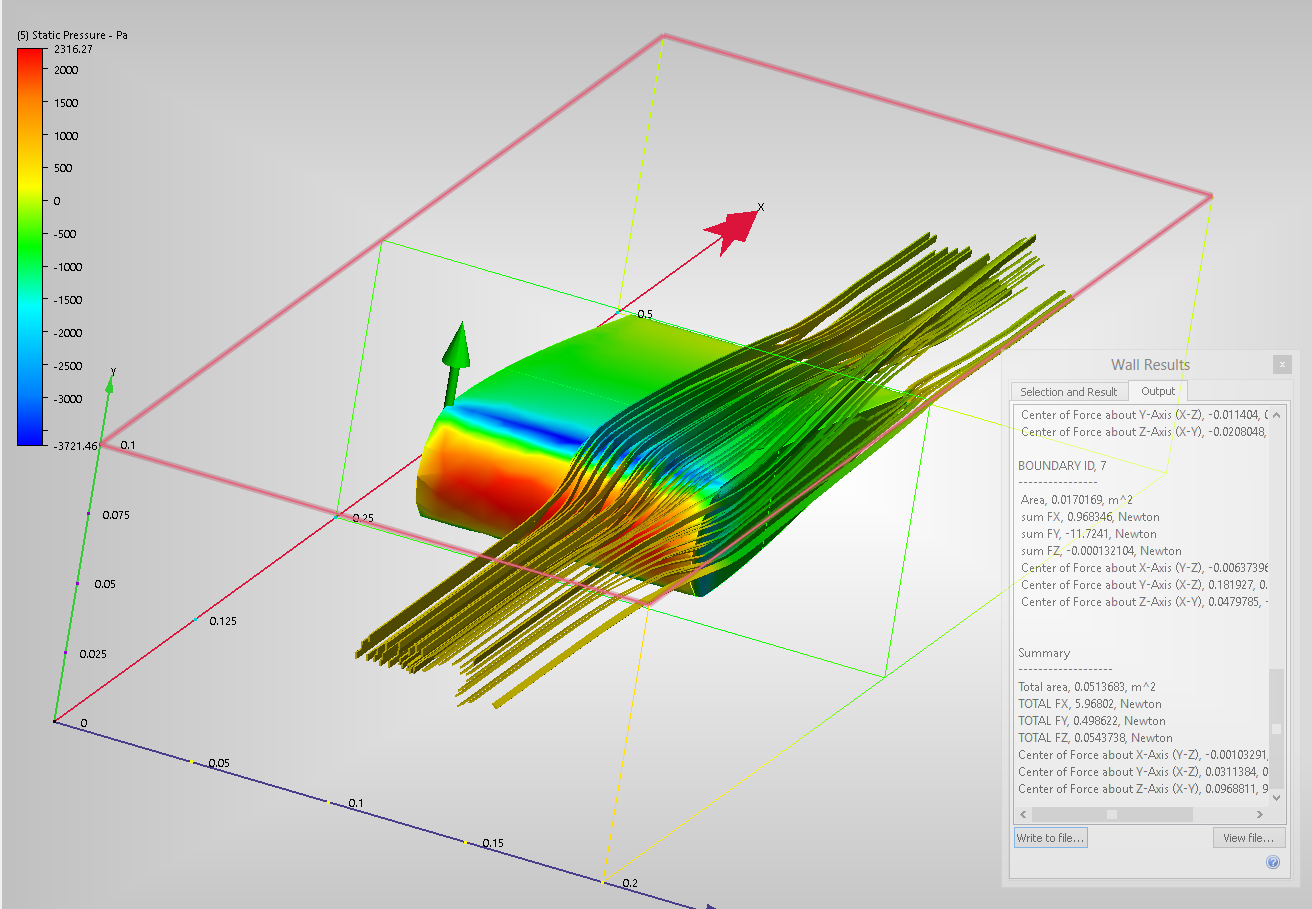
Autodesk is running a competitive Simulation CFD package, after consuming Blue Ridge and developing the program further (previously known as CFdesign), this product is now fully available and from recent use I can confirm it has an easy to use interface with fully developed numerical solutions to manufacturers problems.
I spent less than 5 minutes knocking up a simple Aerofoil, of which I saved and placed into Simulation CFD as a parasolid.xt. After getting to know the software and applying the correct parameters I had a fully working model that was showing vector displacement, ribbon flows and aerodynamic forces working on the aerofoil. This aerofoil above was run using external incompressible flow.
Autodesk website has a fairly extensive list of tutorials that are easy to run depending on your modelling skills:
http://www.autodesk.com/wikihelp-cfd-tutorial-2014-enu
4 Oct 2013
Autodesk Labs - Project Chronicle
If you have a need to capture interface workflows from within Autodesk products for the purposes of training or as webinars for your clients, Project Chronicle is now available on the Autodesk Labs website.
It combines video and audio capture with a timeline which displays the specific command clicks, dialogue box, file, and product used at each point in time, in sync with the video's playback.

There is a site dedicated to publicly available user created Chronicles here which already has around 600 uploads already, but users can also upload private Chronicles to keep their information and know-how to themselves and their organisation.
Project Chronicles will be available as a free download until 1st February 2014.
It combines video and audio capture with a timeline which displays the specific command clicks, dialogue box, file, and product used at each point in time, in sync with the video's playback.

There is a site dedicated to publicly available user created Chronicles here which already has around 600 uploads already, but users can also upload private Chronicles to keep their information and know-how to themselves and their organisation.
Project Chronicles will be available as a free download until 1st February 2014.
5 Aug 2013
Autodesk 3D Print Utility
The 3D Print Utility optimizes the 3D printing of a model for best results and making it super easy to get a good 3D print by making sure the model is oriented the best way to print and support, healing the model of bad surfaces or holes as your model must be “watertight” closed to print in most cases, and also optimizing the material usage. You can print from within some of the free 123D Apps, or use the stand alone 3D Print Utility to open a STL or OBJ and print them.
In addition to the healing, the 3D Print Utility also allows you to change options like thicken thin regions or hollow the 3D print. It auto-magically adds support material so you to print more complex objects with overhangs like the Delicate Arch model of mine.
The Autodesk 3D Print Utility is compatible with all MakerBot Replicators, the Objet Connex 500 and Alaris 30, or OBJ and STL file export.
For more info on the Autodesk 3D Print Utility check out the 123D Team’s blog post:
Introducing the Autodesk 3D Print Utility
http://blog.123dapp.com/2013/07/introducing-the-autodesk-3d-print-utility
Where do I get more Autodesk 123D Free Apps? –> http://www.123dapp.com/
Posted By Andy (Application Engineer)
14 Dec 2012
Autodesk Exchange Apps for Inventor 2013
Autodesk Exchange Apps is an online resource where you can browse and purchase Apps (including product-specific content such as models, training materials and eBooks) – and is available to several Autodesk Products. You can download some items for free and others for a nominal fee. Purchasing is handled via PayPal at this time. Purchases and downloads can be tracked online, or by using the Autodesk Exchange App Manager that is included with the respective Autodesk product.

Access the Autodesk Exchange Apps website here: http://apps.exchange.autodesk.com/

Access the Autodesk Exchange Apps website here: http://apps.exchange.autodesk.com/
5 Dec 2012
Windows 8 Support for Autodesk products
Autodesk intends to support many of the key products on Windows 8 and will add additional products to the list of products supported on Windows 8 as updates and future versions are released. Autodesk Product Support will provide its best effort to assist customers who have issues with products that are not currently supported.
The Autodesk products listed below have been tested and are confirmed as working correctly on Microsoft Windows 8 operating system:
The Autodesk products listed below have been tested and are confirmed as working correctly on Microsoft Windows 8 operating system:
- Autodesk 3ds Max 2013
- Autodesk 3ds Max Design 2013
- Autodesk Maya 2013
- Autodesk MotionBuilder 2013
- Autodesk Mudbox 2013
- Autodesk Softimage 2013
- Autodesk SketchBook Designer 2013
4 Dec 2012
Micro Concepts Ltd 'Open Doors' event a huge success!
On the 7th November 2012 Micro Concepts Ltd hosted its second 'Open Doors' event giving its customers the incredible opportunity to come and sit the Autodesk Certification exams for FREE. The response from our customers was fantastic and more than twenty five exams were taken by our customers.

9 Nov 2012
Vault Keyboard Shortcuts
For those of you who like their Keyboard Shortcuts, you can use hotkeys to quickly access Vault commands too.
Vault Client
Vault Client
8 Nov 2012
Extension for Autodesk 3ds Max Design 2013
The Extension for Autodesk 3ds Max 2013 software and 3ds Max Design 2013 software delivers new solutions that help you create and refine the look you require, faster and more easily.
Features:
Features:
- MassFX mParticles - Create particle simulations that replicate real-world effects with the new mParticles module for the MassFX system of simulation solvers. With Birth operators optimized for MassFX simulations, a preset flow for easier initial setup and two easy-to-use modifiers that enable particles to affect standard mesh objects, mParticles helps you create stunning simulations with less effort.
7 Nov 2012
Getting Started and Help with AutoCAD WS
AutoCAD WS is an easy-to-use web application that allows you to work on your AutoCAD drawings from anywhere and with anyone. With AutoCAD WS you can view, edit, and share DWG files through a web browser or mobile device.
What can you do with AutoCAD WS?
What can you do with AutoCAD WS?
- Upload DWG files directly from AutoCAD software to an online workspace.
- View and edit DWG files from anywhere, using just a web browser or mobile device.
- Invite design team members to review and edit DWG files online; no software required.
- Allow multiple people to work on the same DWG file online, in real time.
- Record changes to designs in a timeline for version control and auditing
- Store drawings and project related documents online, eliminating the need for redundant copies, backups, or archiving solutions.
6 Nov 2012
LABS - DesignScript for AutoCAD 2013

DesignScript is a unique language. It is intended to help designers build and analyse complex geometric models that would be difficult to model with interactive techniques. This type of exploratory design is best served by a scripting language that is designed for exploratory programming. Additionally DesignScript is intended to be used by designers with little previous programming experience. It is much less rigid than conventional programming languages, and it is completely integrated into the host geometry application (currently 64-bit AutoCAD).
DesignScript introduces the distinction between a generative description of a design (as a script) and the resulting generated model. The designer no longer directly models the resulting design: instead he develops a script whose execution generates the model. This enables a completely different kind of design model to be created. The design process is also different. An apparently minor edit to the script could have a profound effect on the generated model, and this enables the exploration of a vast array of alternatives, with much less effort than manual interactive modelling.
The free technology preview of DesignScript application includes:
- the language,
- an IDE (interactive development environment) for editing, debugging and executing scripts,
- a geometry library to generate geometry, initially within AutoCAD,
- analysis and simulation tools.
The technology preview will operate until March 31, 2013.
You can find the download on Autodesk Labs at:
http://labs.autodesk.com/utilities/designscript
4 Oct 2012
Project Hydra for Autodesk Simulation Multiphysics/Mechanical 2013

Project Hydra is a free technology preview that is compatible with Autodesk Simulation Multiphysics 2013 and Autodesk Simulation Mechanical 2013 software.
The features of the Project Hydra technology preview include:
-
Improvements to the Parametric Design Studies (PDS) feature
Some improvements to the previously released (in Technology Preview Project Scout) PDS include the ability to export results as a CSV file and the support for CAD additions such as bolts/joints as well as remote loads and boundary conditions.
-
Import temperatures from Autodesk CFD
Temperatures from Autodesk CFD can be imported to linear, thermal, and MES analyses. Both steady-state and transient Autodesk CFD results can be imported as appropriate. To use this feature go to the respective Thermal tab in the Setup->Parameters dialog and choose "Simulation CFD file" as the "Source of Temperature."
-
New fast Subspace with AMG solution of dynamics analyses
For larger dynamics (modal, natural frequency) analyses with relatively small numbers of needed frequencies, a faster solution option is available: Subspace-AMG. The dynamics analysis solver will automatically switch between this new solver and the pre-existing one depending on the size of the model and the number of frequencies requested.
-
Inquire results by part
A new capability that allows the user to inquire the displayed result of any analysis on a per part basis has been added.
-
Improvements to the Drop Test Wizard (DTW) feature
The DTW from Project Scout has also been improved in Project Hydra.
-
Rerelease of the GPU-enabled AMG Solver (AMG-MF)
The Project Scout AMG Solver (AMG-MF) is being rereleased in this Tech Preview. This solver is faster than the original AMG solver for a class of well-conditioned and bulky models. Additionally, this solver can utilize a supported NVIDIA video card if requested.
The technology preview will operate until April 1, 2013.
You can find the download on Autodesk Labs a:
http://labs.autodesk.com/utilities/hydra
3 Oct 2012
123D Catch for iPhone Released
Autodesk launched the new free Autodesk 123D Catch app for iPhone on the App Store. Complementing the iPad, desktop and web app versions, the app lets users take photos from their camera on iPhone and upload them to the cloud where the photos are converted into a 3D model.
The Autodesk 123D Catch app for iPhone and iPad allows users to capture the world around them in 3D anytime, anywhere. The app features a capture window that includes familiar iOS camera controls to help manage focus and exposure while taking the photos. Users can then review the photo thumbnails before submitting them to the Cloud where the photos are transformed into a 3D model. The Autodesk 123D apps tap into Autodesk’s rich 3D design software heritage for professionals yet are easy enough for everyone to experiment and enjoy the creative process and make their designs real.
The connected workflow between the Autodesk 123D family allows captures made in the 123D Catch app to later be fabricated as a 3D printed object, or to be used as the foundation for further 3D modeling and 3D animation. To enhance the workflow, Autodesk has implemented new editing tools in the Autodesk 123D Catch web app that make it simpler to prepare catches for 3D printing. The new editing capabilities helps users to seal up holes within 3D models, smooth out surfaces, delete portions of the model they don’t want to print and create a flat surface as a stable base for 3D printing. Currently users can also access the My Corner feature to access files across 123D apps, including 123D, 123D Catch, 123D Make, and 123D Sculpt.
The Autodesk 123D Catch app is exclusively available for iPhone and iPad through the App Store at www.itunes.com/appstore. The Autodesk 123D Catch web app can be found at http://www.123Dapp.com/catch.

The Autodesk 123D Catch app for iPhone and iPad allows users to capture the world around them in 3D anytime, anywhere. The app features a capture window that includes familiar iOS camera controls to help manage focus and exposure while taking the photos. Users can then review the photo thumbnails before submitting them to the Cloud where the photos are transformed into a 3D model. The Autodesk 123D apps tap into Autodesk’s rich 3D design software heritage for professionals yet are easy enough for everyone to experiment and enjoy the creative process and make their designs real.
The connected workflow between the Autodesk 123D family allows captures made in the 123D Catch app to later be fabricated as a 3D printed object, or to be used as the foundation for further 3D modeling and 3D animation. To enhance the workflow, Autodesk has implemented new editing tools in the Autodesk 123D Catch web app that make it simpler to prepare catches for 3D printing. The new editing capabilities helps users to seal up holes within 3D models, smooth out surfaces, delete portions of the model they don’t want to print and create a flat surface as a stable base for 3D printing. Currently users can also access the My Corner feature to access files across 123D apps, including 123D, 123D Catch, 123D Make, and 123D Sculpt.
The Autodesk 123D Catch app is exclusively available for iPhone and iPad through the App Store at www.itunes.com/appstore. The Autodesk 123D Catch web app can be found at http://www.123Dapp.com/catch.
1 Oct 2012
Tea Break Video - 3ds Max Design
This video was recently released by Autodesk showing some of the best work created by Autodesk customers in post production using Autodesk products like Flame, Smoke, Maya, 3ds Max and Softimage.
We thought we would share this to inspire those of you who were wondering what you can use 3ds Max Design inside your Product Design Suite for.
We thought we would share this to inspire those of you who were wondering what you can use 3ds Max Design inside your Product Design Suite for.
24 Aug 2012
Fatal Error Applying Service Pack 1 for AutoCAD/LT 2013

You are encountering this issue due to a problem with Service Pack 1 for AutoCAD 2013 and AutoCAD LT 2013. We are actively working on resolving this issue. It is recommended that you uninstall Service Pack 1 until further notice.
22 Aug 2012
LABS - Project Scandium for Autodesk Simulation Moldflow 2013

Project Scandium for Autodesk Simulation Moldflow 2013 software is a free technology preview that extends simulation capabilities by offering new capabilities to try out and provide feedback.
31 Jul 2012
Setup an AutoCAD WS Folder on Your Desktop
A quick Autodesk tutorial on how to create an AutoCAD WS folder on your desktop from which you can upload and download files from your online account using simple drag & drop.
25 Jul 2012
Update or Service Pack
We have had quite a few questions on this subject since the release of the Autodesk 2013 products. So, when we stumbled upon this Autodesk article, we thought it was worth sharing:
"We have seen a couple of questions come up on the Inventor newsgroup around the new Update mechanism that the Inventor team has initiated and whether Updates replace Service packs going forward.
Let it be clear that Inventor will still have Service Packs going forward! As its name implies, Updates are intended to deliver critical updates (formerly Hotfixes) on a more predictable schedule. Think of it as a bundle of Hotfixes.
Service Packs allow us to deliver more complex changes but require more time to produce and verify than Updates. Like Hotfixes, Updates only affect targeted areas of the product associated with particular issues.
There are a couple of other differences between Service Packs and Updates:
In order to verify if you have Update1 installed, you need to go to the Windows > Control Panel and use Programs and Features and View installed updates."

This is an extract from the Being Inventive, Manufacturing Community Blog
"We have seen a couple of questions come up on the Inventor newsgroup around the new Update mechanism that the Inventor team has initiated and whether Updates replace Service packs going forward.
Let it be clear that Inventor will still have Service Packs going forward! As its name implies, Updates are intended to deliver critical updates (formerly Hotfixes) on a more predictable schedule. Think of it as a bundle of Hotfixes.
Service Packs allow us to deliver more complex changes but require more time to produce and verify than Updates. Like Hotfixes, Updates only affect targeted areas of the product associated with particular issues.
There are a couple of other differences between Service Packs and Updates:
- Service Packs can be included in deployment images, Updates can not
- Service Packs increment the build number, Updates do not
- After applying an Update you will neither see a difference in the build number nor a change to the release name in the About dialog.
In order to verify if you have Update1 installed, you need to go to the Windows > Control Panel and use Programs and Features and View installed updates."
This is an extract from the Being Inventive, Manufacturing Community Blog
24 Jul 2012
LABS - Inventor Fusion for MAC

The free Autodesk Inventor Fusion Technology Preview showcases intuitive direct manipulation capabilities for unrivaled ease of use, provides direct modeling for rapid design changes without limitations, and unites direct and parametric workflows within a single digital model created in Autodesk Inventor.
This updated technology preview of Inventor Fusion offers two new exciting capabilities:
- Surfacing support - Users can now work seamlessly between solids and surfaces, expanding their confidence and capabilities to tackle design changes. By enhancing the existing translators to read surface data and adding new Parasolid, Rhino, IGES and AliasDesign .wire file import capabilities user have access to an even larger number of design formats.
- Simplification wizard - Simulation users now have one button simplification of designs. This makes simplifying common geometry fast and easy and ensures that mesh and solves times are as fast as possible.
- Ease of use improvements - New marking menus, sketch ease of use and modeling ease of use, make this release of Inventor Fusion the easiest to use yet. Did we mention it was easy?
Availability:
- The Microsoft Windows compatible technology preview executable expires on April 1, 2013.
- The Apple OS X compatible version of the technology preview expires on January 1, 2013.
You can find the download on Autodesk Labs at:
http://labs.autodesk.com/utilities/fusion/overview/5 Jul 2012
Free Online Image Editing and Sharing Tools from Autodesk
Pixlr products are free online and mobile image editing tools and utilities for creating, editing, and sharing images. From full-featured image editors for people who want to quickly create a custom image for a website or Blog, to fun apps that apply retro filters to your photos, to simple utilities for fetching and sharing images, Pixlr provides a variety of tools that start up fast and are simple to use:

- Pixlr Editor - A free, online, full-featured image editing and creation tool.
- Pixlr Express - A simple and immediate online tool for quick image adjustments.
- Pixlr Grabber - Fetch images and screen grabs from your desktop and browser.
- imm.io - An image sharing service that allows you to upload an image and share it with friends via a link in just one click or with social platforms like Facebook, Twitter, and more.
- Pixlr-o-matic - A fun and playful post-process darkroom where you can experiment with different effects, overlays, and borders. Get Pixlr-o-matic on the web or from the Apple iTunes Store.
Subscribe to:
Posts (Atom)