Showing posts with label 2014. Show all posts

22 Apr 2014

3DS Max Design 2014 Service Pack 5

3DS Max Design 2014 is now at SP5.

Please note: you will have to uninstall any beta or RC versions of 3DS Max from your system before applying this update.

The file can be found here:

Vault 2014 Service Pack 2

Service Pack 2 for Vault has been released.
Do not install this if you are on Vault Subscription Release 1, see this blog article.


Ensure you thoroughly read the readme before applying this update, which can be found here:

http://knowledge.autodesk.com/support/vault-products/downloads/caas/downloads/content/autodesk-vault-2014-service-pack-2-for-autodesk-vault-basic-2014-autodesk-vault-workgroup.html

Inventor 2014 SP1 Update 3

Another cumulative update for Inventor 2014 SP1 i.e. if you don't have Update 1 or 2 yet you can ignore them and go straight to Update 3.  You do need SP1 installed, however.

The download and readme's can be found here:

http://knowledge.autodesk.com/support/inventor-products/downloads/caas/downloads/content/update-3-for-inventor-2014-service-pack-1.html

AutoCAD 2014 ViewCube hotfix

There is a hotfix available for issues with the viewcube appearing on the output when plotting to PDF/DWF.

This applies to all versions of AutoCAD including Mechanical and Electrical.

http://knowledge.autodesk.com/support/autocad-mechanical/downloads/caas/downloads/content/autodesk-autocad-viewcube-hotfix.html

Micro Concepts TLA 2014


The dates for this year's Technical Learning Academy have been finalised and we'll be hosting our day sessions in an area near you throughout May and early June.

Make sure you sign up for one of the following days:

13th May 2014 – Northampton
14th May 2014 – High Wycombe
15th May 2014 – Norwich
20th May 2014 – Duxford
21st May 2014 – Duxford
22nd May 2014 – Duxford 
5th June 2014 – Bristol

The TLA events are hands on days for Micro Concepts subscribers, with the exception of the 22nd which is an open day for non-subscribers.
We will have a range of topics covering product updates, how-to's and best practice techniques and as always you'll be able to ask questions and get answers from the team.

Get in touch with Andy Rogers if you would like to book a place.  They are limited so make sure you get in quick.


14 Apr 2014

Vault WG/Pro 2014 update paths


Updating your Vault server and client is always something to plan in advance, especially the server as it will take the Vault offline while it upgrades and then take time to migrate your databases to the latest version.
If you are running Vault Workgroup or Professional and are using, or intend to use the Subscription Release, then the latest service pack offerings from Autodesk should be handled with slightly more care than usual.

The following upgrade path is advised:

Vault > Vault SP1 > Vault Subs1 > Vault Subs1 SP1

You should ignore Vault SP2 completely where the Subs Release is concerned.

If you are not on subscription, or do not want to use the Subs Release, then the standard path of SP1 then SP2 will not be a problem.

A tip is not to launch the ADMS Console until you have applied all updates.  Launching mid-way will require a separate migration for each stage.

S.C.

31 Mar 2014

Free Surface modelling in Simulation CFD 2014

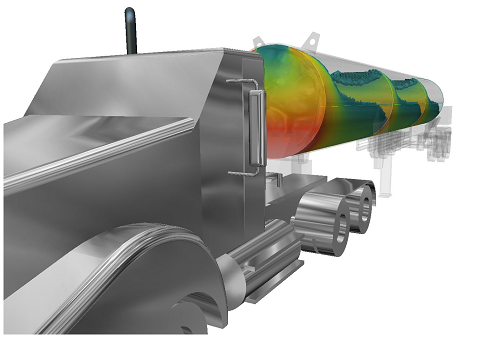
The 2014 release of Autodesk Simulation CFD Advanced/Motion brought with it the ability to simulate free surfaces in liquid volumes.  The applications of this are numerous and range from sloshing in tanks, the path of free flowing water, and hydrodynamic pumps and propulsion.


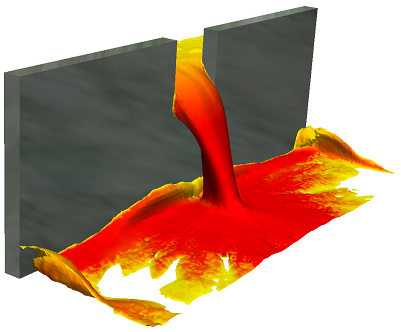
While the mathematical functions behind it are extremely complex, the setup of free surface is actually very simple.  Here's a quick start guide to getting yourself up and running with a free surface analysis in Sim CFD.  Keep the following image of fluid pouring through a gate in mind for our example.


1) Model only your fluid volumes.  You will need at least 2 distinct solid bodies.  Model a reservoir and a basin, and the gap that they will pass through (the gap can be part of the basin volume).  There's no need to model anything else, since you will only be concerned with flow rather than heat transfer, unless you want to take wall roughness into account.

2) Launch your model into Sim CFD from the tab in Inventor.

3) Apply materials.  All volumes should be the same e.g. water, even the initially empty volumes

4) Skip boundary conditions.  We don't need any boundary conditions for this analysis since it is self-contained i.e. nothing enters or leaves the system.

5) Add an HOF initial condition to the reservoir fluid volume only - set the value to 1.  HOF (height of fluid) is an on/off value (0 or 1) that instructs the application as to which particular fluid volume is filled at the start of the analysis.  Any volumes not designated a height will be seen as empty.

6) Open the Solve dialogue.  
- On the Physics tab, click Free Surface and check the Enable Free Surface box.  Enter your gravity direction, which is usually negative Z (0,0,-1) but your model may vary.
- On the Control tab, the Solution Mode will default to Transient.  You will want to set more save intervals than usual for smooth fluid flow visualisation at the end of your solve.
- Choose a large number of Time Steps (1000+) to Run then click Solve.

7) To visualise the results:  right-click in space and choose Free Surface.  You will then see the HOF value in action throughout the solution.  For planes and ISO surfaces, choose VOF and plot as required.  VOF at 0.5 represents the fluid-gas boundary.

S.C.

4 Dec 2013

Simulation CFD 2014 Service Pack 2

This one has been available since September, but is worth highlighting for those new to the software.

"A service pack (SP2) has been released for Autodesk Simulation CFD 2014. This marks the second update available to Simulation CFD 2014 and can be applied without SP1 being install on your computer. In this service pack various defects were resolved. In this solution article you will find more information covering the highlights of the service pack, the patch file, and links to the release notes."

32-Bit Installer (.msp ~55 MB)
64-Bit Installer (.msp ~63 MB)

As always, follow the Release Notes before upgrading.

Highlights of Issues Addressed in this Service Pack:
  • The Thermal Comfort topic in the Help documentation was clarified to indicate that running radiation as a “0-iteration” analysis after the simulation is complete can improve accuracy in some cases.
  • The Simulation CFD launch command does not appear in the SolidWorks 2013 user interface.
  • The transient harmonic boundary condition does not produce the correct results distribution on the applied surface. 
  • The UGNX CAD Connection license is not being checked out correctly when launching from UGNX into Simulation CFD.
  • The average temperature reported on a Summary Part in the Decision Center is incorrect and different from the value reported in the Parts dialog box and in the Component Thermal Summary (CTS) file.
  • Absolute Pressure is displayed incorrectly when solid parts are included within the simulation.
  • The Help documentation contains an incorrect description of the path needed to manually configure the Simulation CFD launcher in UGNX.
  • A simulation that contains periodic boundary conditions exits unexpectedly and fails to complete.
  • Simulations that contain distributed resistance surface parts and are run with an analysis length unit other than meters do not predict the correct operating pressure for the fan
  • Locally installed Help documentation does not load on XP.
  • When opening a Simulation CFD 2013 Design Study file that was created on a non-English OS into Simulation CFD 2014, the localized string for “CAD Volume” appears as garbled text.
  • A particular Design Study causes Simulation CFD 2014 to crash when the simulation is opened after having finished running. 
  • In a design study containing multiple scenarios, right click on a non-active scenario, enable Adaptation and set the Solver Computer to Local. A crash occurs when activating this scenario after the simulation is complete.
  • Simulation CFD crashes if no solver computer is selected prior to clicking Solve to start the simulation. 
  • The indicated progress percentage is incorrect for a transient simulation that includes multiple inner iterations per time step. The indicated progress percentage can surpass 100%.

2 Oct 2013

Inventor 2014 Service Pack 1

The first Service Pack for Inventor 2014 is now available for download:

Inventor2014_SP1_x86.msp (49272Kb)
Inventor2014_SP1_x64.msp (93768Kb)

Some of the issues addressed in this update (please consult the Readme for the complete list):

    Autodesk Inventor Professional 2014

      Cable & Harness
      • For some particular dataset, after placing a nail board view of a Cable & Harness assembly in a drawing file, Inventor unexpectedly exits when you close the drawing file without saving and then closing Inventor.

      Stress Analysis
      • Contacts in solids and faces at vertices are identified as face-face contacts. 
    Autodesk Inventor 2014


      Assembly Modeling
      • Cannot make a weldment iAssembly material valid as a weldable material. 

      Design Accelerator
      • Bolted connection does not update automatically when you repostion its location by changing the placement sketch point.

      Part Modeling
      • In the Insert iFeature dialog box, the help button is disabled if the iFeature is created with a legacy localization build.
      • iPart members do not show sketch and block definition.
      • iPart created from a feature with no dimension generates empty children.
      • When you measure distance in an iPart member, on the context menu Select Other is grayed out.
      • Mass calculation fails for a part that uses unpatched Rhino surface data.
      • ... more in the Readme

      Sketch
      • Cannot switch on and off the visibility of a sketch block when you edit the sketch.
      • Cannot create a coincident point when you attach a line to a projected point.

27 Sept 2013

AutoCAD Electrical 2014 Service Pack 1

The first Service Pack for AutoCAD Electrical 2014 is now available for download:


 ACE2014SP1_32bit.exe (exe - 33858Kb)
 ACE2014SP1_64bit.exe (exe - 44248Kb)


Some issues addressed are as follows:
Problems Reported with the Customer Error Reporting Utility
As a result of detailed information from customers who used the Customer Error Reporting Utility, a number of problems were identified and fixed. This service pack also includes problems fixed by Autodesk AutoCAD 2014 Service Pack 1. Updates have been made in the following commands and features:
Project Manager
  • Occasional crashes while working with Project Manager.
OLE
  • Occasional crashes or program hangs when performing copy and paste or plot operations with drawings that contain OLE objects.

General Service Pack Updates
This service pack also includes Autodesk AutoCAD 2014 Service Pack 1. The following defects have been addressed by AutoCAD Electrical 2014 Service Pack 1:
Cross Reference
  • Symbol mapping option of the table style cross referencing does not work unless the library is listed first in the Project Properties.
Catalog Lookup
  • Catalog data shifts some of the columns when do the Catalog Lookup for some special database.
  • Catalog lookup locks up when switch from a table have more columns to a table have less columns.
Insert/Edit Components/Footprints
  • Insert Panel from Schematic list may fail in some Localization version.
  • DESC1, DESC2 and DESC3 are not copied to multi-pole when insert child poles.
Ladder
  • Set Line reference values with sheet number template does not update to match the drawing sheet number during creation of new drawing.
Project Tools
  • Project_wide update always save drawings in 2013 format.
  • Component Update From Catalog does not work well to update the Weblink and Pinlist.
Tagging
  • Fails to recognize duplication of tag when working with multiple drawings.
Terminal Strip Editor
  • Cannot sort by all column headers in Terminal Strip Editor.
  • Poor performance when editing the Terminal Strip that contains lots of terminals.

26 Sept 2013

AutoCAD Mechanical 2014 Service Pack 1

The first Service Pack for AutoCAD Mechanical 2014 is now available for download:

 ACM2014SP1_32bit.exe (exe - 31293Kb)
 ACM2014SP1_64bit.exe (exe - 43921Kb)


Some issues addressed are as follows:
Problems Reported with the Customer Error Reporting Utility
As a result of detailed information from customers who used the Customer Error Reporting Utility, a number of problems were identified and fixed. This service pack also includes problems fixed by Autodesk AutoCAD 2014 Service Pack 1. Updates have been made in the following commands and features:
Shaft
  • Crashes in shaft calculations.
Centerline
  • In some drawings, grip edit of centerlines can result in crash.
Surface Texture
  • Crashes when adding leaders to surface texture symbols in Windows 8.

General Service Pack Updates
This service pack also includes Autodesk AutoCAD 2014 Service Pack 1. The following defects have been addressed by AutoCAD Mechanical 2014 Service Pack 1:
XREF Binding
  • Some xref drawings cannot be binded.
  • Performance issue when binding large xref drawings one at a time.
Partlist
  • Partlist items from drawings saved in AutoCAD Mechanical 2007 version cannot be updated.
Content
  • Description of some External Thread Ends is not correct.
  • Description of hole in hole chart is not translated in the German version of AutoCAD Mechanical 2014.
Shaft
  • Side view of DIN 5480 profile is not shown correctly in the drawing.
Hatch
  • Block attributes are removed after deleting hatches and disabling AM_6 layer.
STEP and IGES
  • IGESIN/IGESOUT and STEPIN/STEPOUT commands are not available in vanilla AutoCAD profile.
General
  • In some drawings, AMCONVDWG does not yeild correct results in layer conversion.

23 Sept 2013

Vault 2014 SP1 Hotfix 1

A new hotfix is available for Vault 2014, client and server.  Please read the readme and follow the instructions for your setup.

 DL21995541.zip
Description of the Issues
  1. The Change Order Approval dialog now supports Windows authentication.
  2. Resolved a revision sorting order that resulted in the 'attach file' and 'edit item BOM' features to be non-functional.
  3. Resolved multiple content source property provider issues to prevent DWG check in problems and IIS worker process crashes.
  4. The Web Client now logs in properly after an automatic log out.
  5. Adding a new property to a replicated file and attempting to check out the file or edit the property, incorrectly resulted in the error, "The requested file was missing from the file store."


As always, updating Vault should be a planned event when it is most convenient for your users and server manager so please consult with each other before executing the fix.

6 Aug 2013

3ds Max / 3ds Max Design Service Pack 1 (SP1)


Service Pack 1 for Autodesk® 3ds Max® 2014 / 3ds Max® Design 2014 includes fixes for issues with stability and performance based on customer feedback.

Please select the correct version and readme before installing: