4 Nov 2013

Modular Phone Handsets

In the mobile phone world, the term 'upgrade' currently refers to exchanging your handset for a new one (and extension of your mobile contract for ~2 years), but Dave Hakkens has been hoping to bring the meaning more in line with computer terminology with his Phonebloks concept:


When I first saw this, I appreciated the nobility of the idea but felt a little dismay as it is something I thought would be hard to convince the mobile manufacturing industry to get on board with.  I saw it as the type of concept that makes for great BBC viewing when it is trashed and thrown out of the window in the Dragon's Den.

However, Motorola has just announced a new project called Ara which is the realisation of exactly what Dave proposed.  The vision is to do what Android has done for the software industry and bring open source modular hardware customisation to the smartphone market, and allow users to control the style, cost, and performance of their phones as they see fit (and ultimately reduce the size of hardware graveyards).

Stay tuned for an alpha release of the MDK (Module Developer's Kit) this winter.


31 Oct 2013

Revamped Wiki Help Site

The Autodesk Wiki Help site has had a major overhaul and is now faster, more streamlined, and brings a new visual style which closer matches the theme of the main Autodesk site.  The information contained within is now more up-to-date for your 2014 products and services.


Do bear in mind though; while it can provide information on tools and techniques, it still can't solve your problems - unlike us here at Micro Concepts.

If you have a support contract with us, do remember to give us a call on 01223 716 214 if you encounter any issues, or if you just need clarification on any of the advice listed on the wiki site.

29 Oct 2013

Inserting Inventor DWG views into AutoCAD

When you open an Inventor DWG in AutoCAD, it opens in Layout view.  If you would like to work on it in Model space, you can do so with the DDINSERT command.

1) Open the Inventor DWG in AutoCAD.  It will open in Layout view.


2) From Model space, type DDINSERT.  The Inventor drawing should automatically be selected.


3) Choose which view from the drawing you would like to insert from the drop-down Name menu.

4) Adjust your insertion and scale settings


28 Oct 2013

Windows 8.1 incompatability


Windows 8.1 is not fully supported by Autodesk software at this time.

From our tests so far, and from the official Autodesk blog, Vault is not compatible with the new operating system update.  We were successfully able to load our clients, but not the server.

However, there are fixes for AutoCADAutoCAD Eletrical and AutoCAD Mechanical available now.

If you use Vault then we would advise waiting for more information from Autodesk before updating your operating system to 8.1.


21 Oct 2013

Printing Line Weights in AutoCAD

A simple tip for AutoCAD users:

If you are looking to print the correct lineweights you have applied to your drawings there are a couple of methods you can follow.

The first is to make sure the LWT (line weight) button is turned on below your command bar at the base of the window, this will allow you to view line thickness in the created drawing before going to your plot options.


The second option can be accessed through your Plot Options in the print menu:

To access the extended menu click on the extension arrow highlighted by the green box in the figure below. Here you can change your Print Style (for colours use acad.ctb and for black and white use monochrome.ctb).

The next option is to make sure "Plot object linewights" is ticked on. (Highlighted in the blue box). Ticking this will create realistic lineweights on your printed drawing. 


17 Oct 2013

Tips and tricks for Windows 7

TechRadar have an excellent guide on tweaking Windows 7 to accomplish things you do faster and easier, or even to do things you didn't know were possible.

Some of my personal favourites are as follows:


1. Problem Steps Recorder

Type PSR in the start menu search box.

This very useful tool takes a screenshot for each mouse-click you make, and generates a report containing those actions and images so that others can read and help diagnose any issues you may be having.  Even better, it is a great tool to aid in creating How-To's and training documentation.

7. Calculate more

Click on the View drop down menu in Calculator to access a range of tools to aid in things unit conversion and mortgage evaluation.

22. Explore God Mode

This is like the entire Control Panel and it's sub-options expanded into one large list.
Create a folder and rename it to: God Mode.{ED7BA470-8E54-465E-825C-99712043E01C}

24. Display the old taskbar button context menu

Hold shift while right-clicking on your open taskbar programs to view the old context menu.  Useful for restoring a window that has stopped responding to left clicks on the taskbar.

52. Minimise quickly with shake
While holding the left mouse button on a program's title bar, shake it to minimise everything behind it. This can be useful when you are writing an e-mail with, for example, Outlook and you want to add attachments by dragging and dropping files from your desktop.

93. Close with middle-click

Use the middle mouse button while hovering over the mini-view of a window on the task bar to close it.

Check out the rest of the article for other tips that you might find useful.

14 Oct 2013

A Legendary Van

It started its production in 1950 and was called the 'type 2' very adventurously named after the first production model - the 'Type 1.' In case you hadn't guessed it is the VW Transporter or more commonly known as the camper. The Camper or "Hippie Van" is famous for its days in the raging sixties and its colourful nature.

The small van started life with a flat four, 18kW, air cooled boxer engine mounted in the rear of the wagon (much like its predecessor Beetle). As I'm sure you're all aware that mounting an air cooled engine in the rear of the cab as its downfalls..... to the point they had to completely discontinue one version of the 30kW engine. They did in the 90's while being produced in Mexico (since Germany halted its production in the late 60's) produce a water cooled  1.8 Litre 4 cylinder engine. It was in the end emissions laws that force the most recently produced campers to all be built with water cooled engines. The engines only ever really reached the steady heights of 67kW but they were always concentrated on achieving torque.

Regardless of its popularity, engine problems and less than sober occupants falling out they are about to cease production in the very last Type 2 factory. After 63 years and over 10 million units produced world wide the factory in Brazil is to cease production due to more stringent safety regulations (something about air bags and antilock brakes......). However as many cars now find themselves in scrap yards having achieved their end of life quotas, its a pretty certain fact this Van will be around for some time to come.


10 Oct 2013

Simulating and saving cash

CFD (or Computational Fluid Dynamics) is another rapidly growing simulation environment that is being utilised with ever increasing popularity in the engineering world. This cost and time saving facility is a base of numerical solutions that allow users and their companies to build environments simulating fluid and heat flow.

As you can imagine in certain industries, (Oil and gas for instance) testing for miles of transportation piping networks would be colossal in terms physical practice. CFD simulation packages however enable us to develop and apply physical changes without increasing labour, material usage and that ever increasing importance of lowering carbon footprint.

Autodesk is running a competitive Simulation CFD package, after consuming Blue Ridge and developing the program  further (previously known as CFdesign), this product is now fully available and from recent use I can confirm it has an easy to use interface with fully developed numerical solutions to manufacturers problems. 

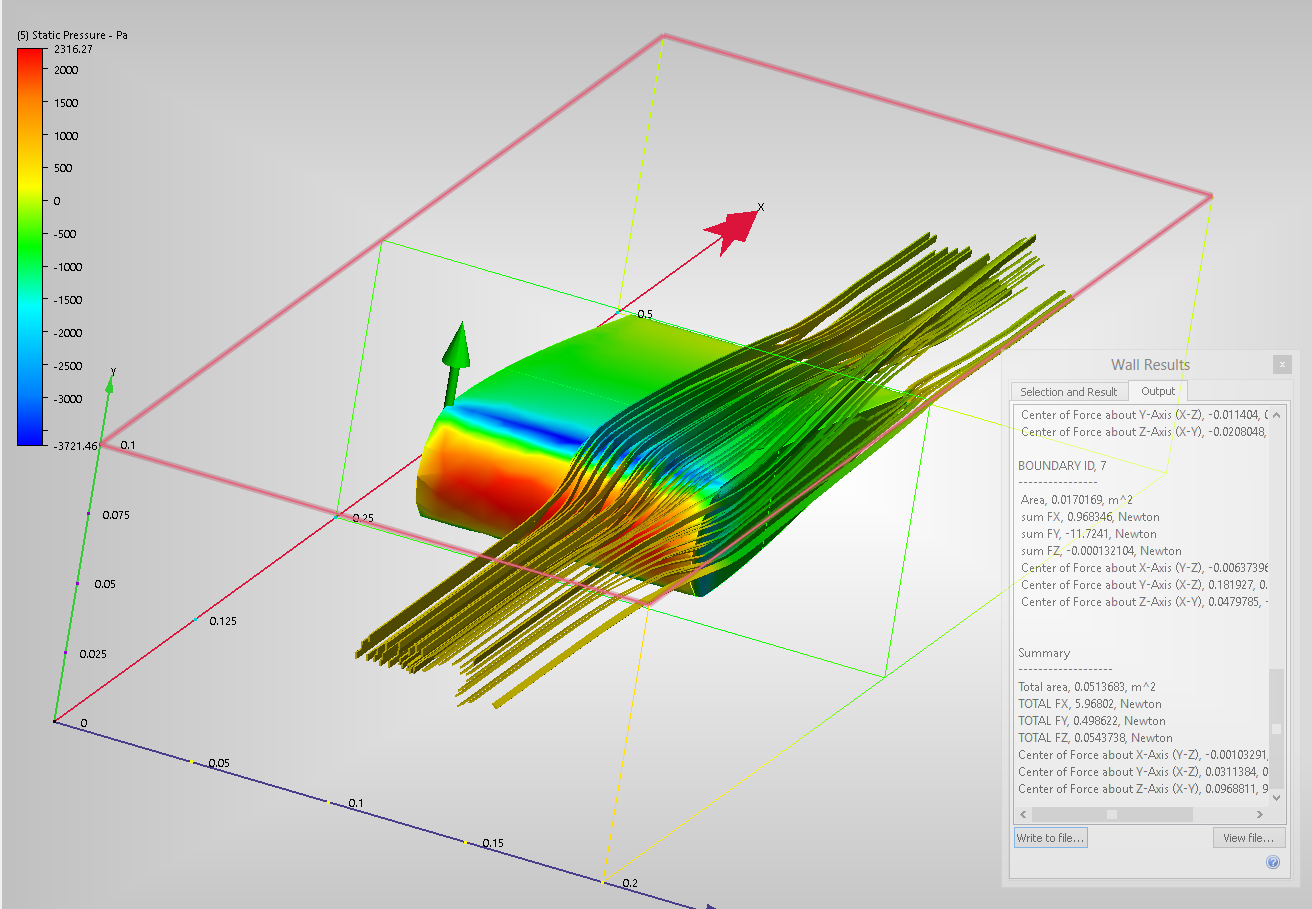
I spent less than 5 minutes knocking up a simple Aerofoil, of which I saved and placed into Simulation CFD as a parasolid.xt. After getting to know the software and applying the correct parameters I had a fully working model that was showing vector displacement, ribbon flows and aerodynamic forces working on the aerofoil. This aerofoil above was run using external incompressible flow. 


Autodesk website has a fairly extensive list of tutorials that are easy to run depending on your modelling skills:

http://www.autodesk.com/wikihelp-cfd-tutorial-2014-enu