7 Mar 2013

AutoCAD requests to Autodesk servers blocked by proxy servers

Issue

You are using AutoCAD 2012-2013 and notice that some requests to Autodesk servers are being denied.
AutoCAD requests to Autodesk servers can be blocked by proxy servers. The following components can be affected when proxies block requests to Autodesk servers:
  • Welcome Screen (AutoCAD 2013 only)
  • Online Help (AutoCAD 2012 and 2013)
  • Sign in to Autodesk (Single sign-in to Autodesk Servers e.g. Autodesk 360, Subscription Center, etc)
  • Sign in to Autodesk 360
  • Autodesk Sync
  • Content Explorer: Accessing SEEK from the Content Explorer AutoCAD plug-in

Solution

If your network uses proxy servers to access the Internet, one of the following methods should help avoid internet access issues for AutoCAD components:
Exception Rules:
If you are experiencing issue accessing Autodesk servers through a proxy, adding an exception to the Internet Explorer proxy settings to allow the following domains to bypass the proxy server should help:
*.autodesk.com
*.google-analytics.com
*.cloudfront.net

Note: Please make sure your network is setup to route requests directly to the these domains without routing through the proxy servers.
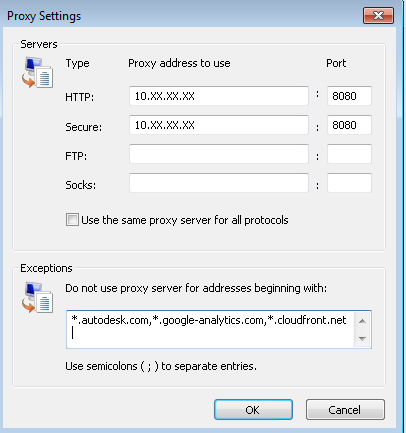


Authenticated Proxies:To use the above mentioned AutoCAD Online components through proxy servers with Authentication enabled, you should enable http (port 80) and https (port 443) access to the following domains in the proxy without Proxy Authentication (i.e. Access for “All users” or Anonymous access through the proxy):

*.autodesk.com
*.google-analytics.com
*.cloudfront.net

Transparent proxies:
An intercepting proxy (also known as a forced proxy or transparent proxy) combines a proxy server with a gateway or router (commonly with NAT capabilities). Connections made by client browsers through the gateway are diverted to the proxy without client-side configuration (or, often, knowledge). Connections may also be diverted from a SOCKS server or other circuit-level proxies.
Transparent proxies will not prevent access to Autodesk Server components.

To see the full Knowledge base article please follow the link below:
Posted by Andy Roe (Application Engineer)

4 Mar 2013

Autodesk Releases 123D Creature, A Tool To Design, Paint, And Print Your Own 3D Monsters

photo

As a fan of monsters and 3D printing, in that order, I was intrigued by Autodesk’s new iOS app, 123D Creature. Aimed at beginning 3D modelers, the app allows you to build cute (or scary) monsters right on your screen by pinching, grabbing, and rotating a lump of virtual clay hanging on a skeleton.
The $7.99 app ($1.99 for a limited time) is the latest in Autodesk’s line of free 3D apps. The company sells much more expensive and complex 3D solutions like Maya and 3ds max but these 123D apps are designed to allow users with little experience to build objects, paint them virtually, and output mesh files that can be used on 3D printers. You can even order 3D prints of your creations right from the app.
Given the perceived difficulty of 3D modeling, these are an interesting way for Autodesk to sneak their tools into the hands of younger designers who could go on to use the company’s more lucrative tools.
How does it work? Fairly well, to be honest.
I tried the app briefly today and was able to design a pointy-headed little man and print him on my home Makerbot. Sadly his arms didn’t quite make it through the print process but his tiny legs and pin head look just fine. I’m no 3D artist, to be sure, so it was fun to be able to make a cute little being and then pump him out of my extruder in a few minutes. Not only does this give 3D novices the chance to experiment with 3D design, it makes folks with 3D printers happy because of the seamless system for making and outputting mesh files for quick prints.

Posted by Andy Roe (Application Engineer)

25 Feb 2013

Interview with Carl White and Anthony Graves about Autodesk CAM

Interview with Carl White and Anthony Graves about Autodesk CAM


If you are reading this, you are probably wondering what is up with Autodesk and their manufacturing program, especially after the recent purchase of HSMWorks. We got to see a preview of what the company was proposing at Autodesk University this past November, but it was little better than a teaser.

I am quite fond of a matured integrated Fusion 360 concept, with visualization, simulation, simplification, and CAM on board, riding a PLM / PDM strata. Notice I did say matured.

What is left unsaid is whether the product will be integrated into the company’s flagship engineering product, Inventor Professional. If so when, and how, and if not, what then?

I was introduced to Carl White in Las Vegas last year. Carl is the Director of Manufacturing Engineering Products at Autodesk. He was kind enough to speak with me on the record about their recent purchase and the new CAM features. He introduced me to Anthony Graves, Product Manager at HSMWorks, who joined in the conversation about the product specifics; well, sort of specific.
Follow the link to read more
http://designandmotion.net/autodesk/autodesk-cam-interview-carl-white-anthony-graves/

Posted By Andy Roe (Application Engineer)

24 Feb 2013

Technical Learning Academy

tla_2013_banner_780

Remember to save the following dates in your diary

This year's Technical Learning Academy dates are as Follows:

2nd May 2013 Bristol (Renishaw Plc)

9th May 2013 Cambridge (IWM Duxford)

23rd May 2013 High Wycombe (Academy Conference & Training Centre)

Watch the Micro Concepts Ltd website for more information.

Posted by Andy Roe (Application Engineer at Micro Concepts)

18 Feb 2013

Get Involved in Autodesk Future Products & Technologies

Get Involved in Autodesk Future Products & Technologies

For those that love to participate in providing early feedback that helps shape the future of Autodesk products and technologies, there are several great options to get involved. You don’t have to be on the bleeding edge or the top Autodesk product user in the universe as all skill and experience levels are encouraged and needed.
Both Autodesk Labs and Autodesk Feedback Community are now managed under the Autodesk Office of the CTO. Both of these valuable future product and technological incubators are vital to Autodesk and of course benefit our customers.
For full details follow the link:
http://autodesk.blogs.com/between_the_lines/2013/02/get-involved-in-autodesk-future-products-technologies.html?utm_source=feedburner&utm_medium=feed&utm_campaign=Feed%3A+blogs%2Fbtl+%28Between+the+Lines+RSS+Main%29

4 Feb 2013

How to renew your Autodesk Subscription contract from Subscription Center

Scenario

As a Contract Manager, you need to view the expiration date of your Subscription contract and/or renew your Subscription contract online.

Solution

If you are a Contract Manager for your Autodesk Subscription account, you can find the expiration date for your Subscription contract and renew your Subscription contract from the Renewal Report in Subscription Center.
The Renewal Report is available 90 days before a contract is due to expire until 30 days following the original contract expiration date. To avoid any late fees, it is important to renew your Subscription contract before the expiration date.


http://usa.autodesk.com/adsk/servlet/ps/dl/item?siteID=123112&id=18152331&linkID=9242018&CMP=OTC-RSSSUP01

1 Feb 2013

Autodesk University 2012 Classes Now Online!


Not everyone gets to go to AU - but everyone can tune in and watch the classes!  Whether you attended AU or not - you will find valuable presentations that are certain to increase your knowledge of your Autodesk product.  Not to mention there are plenty of presentations surrounding the Cloud, BIM and Digital Prototyping!

Blog 1


Are you a CAD Manager?  There is a track of classes just for you!  Are you a programmer?  You'll find that AU is a developers Mecca!

So be sure to check it out today!  Fabulous presentations at no charge?  It doesn't get much better than that.

http://au.autodesk.com/?nd=online_learning

31 Jan 2013

Autodesk acquires PI-VR. Specialist in real time visualisation software.


Yesterday Autodesk completed the acquisition of PI-VR a privately held German software company that specializes in sophisticated real time visualization technology used primarily in the automotive industry.

Some people may have seen this, but apart from joining the bandwagon I wanted to reiterate this announcement and also add some more background, as to what this may offer and what we can hopefully look forward to in the future.

PI-VR primarily offer an application called VRED, which is available in a few different flavours.

Having played around with VRED Pro a couple of years back it’s great to see this solution become part of the Autodesk portfolio.

Similar to Autodesk Showcase, you can make use of HDR environments for real time visualisation and also like Autodesk Showcase Pro 2013 R1 you can link to HDR Light Studio for greater flexibility when wishing to use custom real time environments.

But in addition, depending on the flavour (VRED Essentials, VRED Photo and VRED Professional) you have further levels of benefit from camera control with post processing options, creation of variants, surface analysis, annotation, comprehensive material libraries, real time ray tracing and refraction, animation, and then because of it's greater utilisation of workstation hardware, native support for stereo displays, cave installations, clustering, multi touch and even head tracking support.