Showing posts with label Display. Show all posts

25 Jul 2013

2 new UHD monitors to hit the market

The age when the resolution of desktop monitors far exceeded their TV counterparts seems to have ended.  The high definition standard for computer monitors became 1080p, a marketing buzzword that the manufacturers latched on to as a safe bet to secure sales.  Unfortunately that left the videophiles among us a little miffed as the progress of ever higher resolution monitors became stunted.  Although there are several monitors around the 2560 x 1600 mark, these have been left in a premium price band for several years - a little out of the acceptable price range of most consumers and not quite justifiable by many IT departments.

Now we are entering the UHD age and this is where TV's have the jump on monitors for the first time.  Several manufacturers have already released 4k TV's at prices that don't break the bank when compared to their desktop monitor equivalents.  So far there is little in the way of sub-£20k 4k monitors due for release, but recently I've seen 2 that have caught my eye - the Asus PQ321Q and the Sharp PN-K322B.
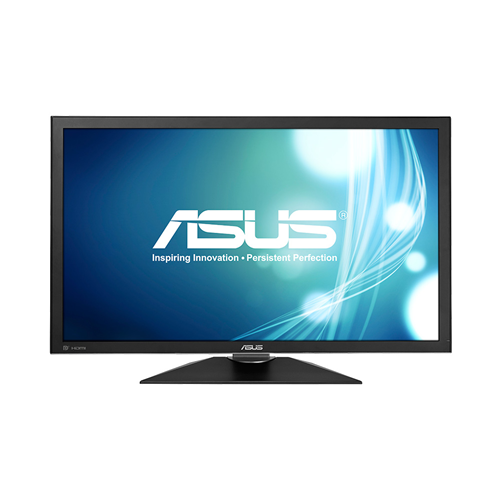
The Asus PQ321Q boasts 31.5" of screen real-estate with the 4k standard of 3840 x 2160 pixels on an IGZO screen (Indium Gallium Zinc Oxide) which allows for smaller pixels.  The panel features a plethora of input options including Display Port and dual HDMI, not to mention a couple of 2W speakers which will help to alleviate the lack of space left for external speakers when this dominates your desk.  Not a huge issue for most, but gamers will not be pleased with it's 8ms response time as they rarely want anything above 5ms.  Whether or not IGZO can compete with the colour reproduction of IPS in varying light levels, it at least has comparable viewing angles of the order of 176 degrees in both horizontal and vertical axes.  Great for when you have an entire production team scrutinizing your hard-thought-out designs.
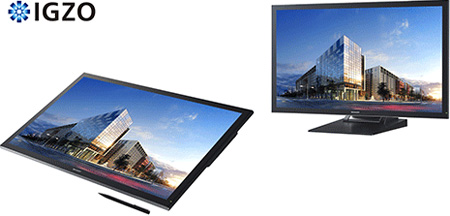


Next up is the Sharp PN-K322B.  It follows along the same path as the Asus version but adds an extra 0.5" to the screen and throws in multi-touch and pen support to the mix.  The image above would suggest it is a dockable screen, but the tech specs don't hint at an internal battery for true portability.  Unfortunately these will only be produced for the Japanese market with a mere 250 per month gracing their shelves, but domestic-only supply hasn't stopped UK consumers wishing to get their hands on cheap 2560 x 1440 South Korean panels.  

Both come in at a price-point  rumoured to be in the range of $3500-$5000 (£2300-£3250) but if you want to utilise them to the fullest you're going to have to find a graphics solution that will be able to cope with these new resolutions so the expenditure won't stop there.  When you consider other options on the market for 4k monitors, these are a little more affordable but they'll still need to drop in price before they become mainstream.  For now, it's good to see the monitor market starting to move forward again.

For more information:


10 Oct 2012

Send AutoCAD Hatch Patterns to the back of the Display Order

If you have a complex drawing with multiple layers of geometry and Hatch Patterns, it can be difficult to pick the right item with so many things on top of each other. So to make things simpler you can send Hatch Patterns to the back in the Display Order. Simply type hatchtoback to send all Hatch Patterns to the back of the Display Order.

2 Oct 2012

3ds Max Design Interface Colour Scheme

Like us, you may want to change the appearance of 3ds Max Design to make things clearer to work with.

If this is something of interest, please follow the steps below:
  • First go to the Customize menu > Custom UI and Defaults Switcher...

31 Aug 2012

Inventor Display Appearance

Display Appearance settings inside Inventor include the elements that compose the scene in the graphics area, such as visual style, ground plane, ground reflection, lighting style and shadows. By default this is set to Use Document Settings, which means that however the Display Appearance settings are configured in the file is how they will appear next time you open it, or how a file will appear from a colleage.

Document Settings

22 Aug 2011

Autodesk Vault Webclient Does not Show Items/Files

When working in the Autodesk Vault Webclient for Vault Collaboration/Professional 2011/2012 you may have noticed that your Items and/or Files are not showing. Instead you just see a status icon saying Loading:


10 Dec 2010

Modify the Recently Opened Projects List

The AutoCAD Electrical Project Manager displays a list of recently opened Projects so you can easily select another Project to open without having to browse for it.